MagSafe Charger Buyer's Guide: Tips and Best Uses
Choosing the appropriate MagSafe charger may make a significant difference in how quickly and consistently your iPhone charges each day. Magnetic alignment simplifies installation; however, not all chargers offer the same speed, build quality, or convenience. This guide helps you cut through the clutter by concentrating on what is most important before purchasing: power supply, compatibility with devices and cases, durability, and design. You'll also learn about how to utilize MagSafe chargers in 2025, from workplace arrangements to travel, as well as how to compare inexpensive and premium models. By the end, you'll understand how to choose the best charger for keeping your phone ready without worry.
What Should You Look for Before Buying a MagSafe Charger?
Charging Speed and Power Output
Power output determines how fast your phone charges its battery. True MagSafe chargers support up to 15 W wireless charging for iPhones, including the iphone 17 magsafe, when paired with a proper USB‑C power adapter, and newer Qi2‑certified models can go even higher, up to around 25 W with the right setup. Lower-watt chargers may charge your phone, but they are slower and less efficient. Always check the quoted wattage and whether the charger is MagSafe (MFM) or Qi2 approved. MFM certification assures that magnetic alignment and power supply adhere to Apple's safety and performance requirements. Check that your power adapter meets or exceeds the specified wattage of 20W or more for full-speed charging.
Compatibility with iPhones and Cases
MagSafe chargers are best used with iPhones with built-in magnets, such as the iPhone 15 and subsequent generations. Certification matters: Made for MagSafe or Qi2-certified chargers, ensuring safe magnetic alignment and maximum power supply. Some chargers merely add magnets without proper MagSafe compatibility, resulting in decreased Qi rates. If you use a phone cover, use one that is suited with MagSafe. A casing that is too thick or does not have internal magnets might weaken the connection and cause charging to be sluggish. Thin MagSafe-compatible casings retain a strong magnetic connection and allow you to charge at maximum speed. Always verify how smoothly the charger snaps on before purchasing, especially if you want to charge via accessories such as wallets or stands.
Portability, Design, and Cable Quality
Think about how the charger fits into your life. Foldable chargers are ideal for travel, while solid supports work best on desks and nightstands. Consider cable quality: braided USB-C cables are more durable and wear-resistant than soft rubber ones. Because certain MagSafe chargers lack a power converter, use a reliable USB-C PD adapter with sufficient power. Consider how you use your phone while charging: stands or slanted docks allow you to view your screen or utilize Standby mode. Choose soft-touch plastics, metal embellishments, or minimalist finishes that are durable and complement your surroundings.
What Are the Best Ways to Use MagSafe Chargers in 2025?
Daily Desk or Nightstand Setup
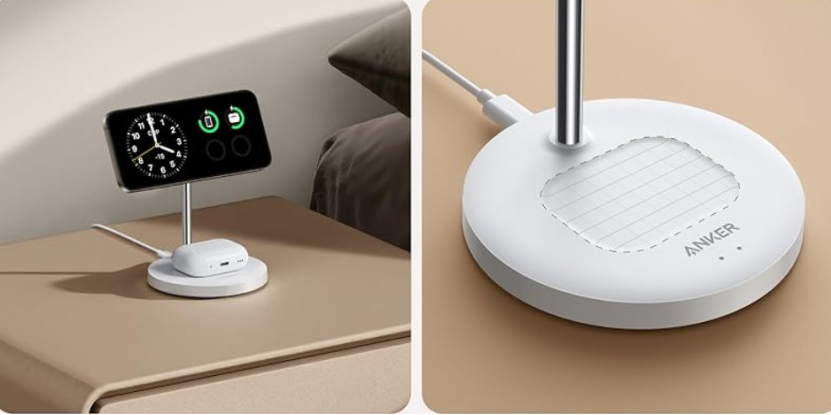
A MagSafe charger at your workplace or bedside simplifies everyday charging. A vertical stand allows you to get notifications and use StandBy without raising your phone. A wireless dock with magnetic alignment keeps the phone steady when taken up. Multi-device stands can charge your iPhone, Apple Watch, and AirPods while avoiding cable clutter. Keep your charger near a power outlet and choose a sturdy base that will not tip over when you attach or detach your phone. Proper positioning keeps your device charged and ready for work or sleep.

MagSafe for Travel and On-the-Go Charging
Outside of a wall outlet, MagSafe chargers and power banks are fantastic. Snap your iPhone into a small power bank with magnetic alignment to use while charging. They are ideal for long days out or flights that demand extended battery life. Consider devices with capacities ranging from 5000 to 10,000 mAh for at least one full phone charge. Portable devices frequently incorporate USB-C ports for charging flexibility. Short, durable cables and a travel-friendly converter allow you to simply charge the charger in between usage. A reliable charger will keep you going on your trip.
Pairing with Wallets, Stands, and Other Accessories
MagSafe is a power and accessory connector. Magnetic wallets securely hold and charge cards without having to remove them from your phone. Integrated MagSafe pucks provide hands-free video conversation and recipe perusal while charging. Some attachments function as card holders, stands, or kickstands. Accessories should not interfere with the magnetic connection or cause delayed charging when connected. MagSafe-compatible enclosures and magnetic grips are small and handy. Choose accessories to make your charger and phone more helpful throughout the day.
How to Pick the Right MagSafe Charger for Your Needs
Budget vs Premium Options: What's Worth It?
Budget MagSafe chargers can suit basic needs, particularly if all you want is a small pad for your desk. Basic versions are typically less expensive, but may lack powerful magnets, braided wires, or high-quality materials. Premium alternatives often include a higher power supply, a stronger build quality, and accessories such as stands or multi-device compatibility. If you charge at your desk or bedside on a regular basis, investing in a well-made stand or dock will pay off in terms of longevity and convenience. For casual usage or vacation, however, a basic portable magnetic charger may suffice. Consider how frequently and where you'll charge; premium features and certifications are more beneficial to frequent users.
Safety Tips and Warranty Checks
When purchasing a MagSafe charger, safety should be your top consideration. Only use chargers that satisfy regional safety regulations and, preferably, are Made for MagSafe (MFM) or Qi2 certified—these assure adequate power management and magnetic alignment. Avoid low-cost, uncertified chargers that may overheat, provide uneven power, or harm your device. For optimal performance, use a high-wattage USB-C power adapter when charging. Check that the maker provides a guarantee and clear support options, so you'll be covered if something goes wrong. Read customer reviews to get real-world insight on performance and dependability. Solid warranties and excellent reviews are good indicators of a reliable charger.
Conclusion
A decent MagSafe charger makes regular phone charging easier, quicker, and more dependable. Focus first on power output and certification; they will decide if your charger provides the speed and safety that your iPhone requires. Consider compatibility with your phone, case, and how you will use the charger—stand, pad, or portable. Tips for everyday settings and travel demonstrate MagSafe's flexibility in 2025. Consider affordable options against premium features based on how frequently and where you charge. Finally, emphasize safety and warranty service to safeguard your device and investment. With the proper MagSafe configuration, charging becomes an easy, integrated part of your daily routine.